In Admin Menu Editor Pro there are two ways you can change menu permissions:
- The list of roles at the top of the menu editor UI.
- The “Permissions” window.
The role list is very simple to use - click on a role to select it, then use the checkboxes that appear on every menu item to choose what menus the selected role will be able to access. Click “Save Changes” when done.
You can also use the special “Current user” and “Super Admin” (multisite only) views to hide certain menus from everyone except yourself - just un-check them for all roles and check them for “Current user”/“Super Admin”.
The “Permissions” window is a little more complicated, but allows for more fine-grained control. The rest of this page will explain how to use it.
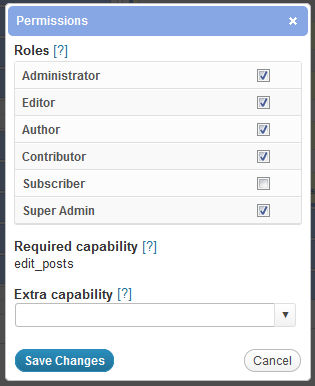
To set menu access permissions, select the menu item you want to customize in the menu editor, locate the “Permissions” field and click the “Edit” button. This will open the “Permissions” window pictured on the right.
The “Permissions” window consists of three sections - Roles, Required capability and Extra capability. We’ll discuss all three below.
Once you’ve customized the settings to your liking, click “Save Changes” to apply the new permissions. You can also click “Cancel” or press the Escape key to close the window without saving.
Roles
This section lets you select the roles that will have access to the current menu. Simply check each box to grant access or uncheck it to remove access.
You can also use a separate plugin like User Role Editor (free) to add new roles or delete existing ones.
Required capability
This field is purely informational. It displays the capability that users must have to access the selected menu. This capability is set by WordPress or the plugin that created the corresponding admin page, and it can’t be changed except by editing the source code.
Admin Menu Editor will automatically grant the required capability to all roles you select in the “Roles” section, enabling them to access the menu.
Some admin pages have more than one associated capability. For example, any user with the “edit_posts” capability will be able to access the “Posts -> Add New” page, but to actually publish a post they will also need the “publish_posts” capability. In such cases, Admin Menu Editor will only display/grant the primary capability (i.e. “edit_posts”). If you need to manage other capabilities, use a separate capability management plugin like the aforementioned Capability Manager.
Extra capability
This is an optional field. You can use it to specify an additional capability check (applied on top of other settings) that users must pass in order to access the selected menu. For example, instead of allowing all administrators to see a particular admin page, you could set the extra capability to “user:bob” to prevent anyone but the user with the login “bob” from accessing it.
Here’s what you can enter in this field:
- Any WordPress capability Only users with the specified capability will see the menu. For example, “manage_options” or “publish_posts”.
- “user:” followed by a user-name Only the specified user will have access to the menu. For example, “user:bob”.
- “not:” followed by a capability or “user:username” Only users that don’t have the specified capability or user-name will be allowed. For example, “not:user:bob” will block the user with the login “bob”.
- Two or more of the above separated by a “+” sign Only users that pass all of the specified conditions will be allowed. For example, enter “edit_posts+publish_posts” to allow only users that have both of the listed capabilities.
- A comma-separated list of any of the above Only users that pass at least one of the checks will be allowed. For example, “user:alice,user:bob,user:charlie” will let only Alice, Bob and Charlie access the menu.
Notes
- If you want to hide an entire top-level menu from a particular role or user, you’ll need to edit the permissions of all of its sub-menus, too. A top-level menu will stay visible as long as it has at least one visible sub-menu.
- Be careful when giving a user or role access to a menu that they normally wouldn’t be able to use. This also gives them the capability displayed in the “Required capability” field, and some capabilities - like “manage_options” - can provide access to sensitive WordPress features.
- Be even more careful when customizing the permissions of the “Menu Editor” menu. It is entirely
possible to lock yourself out. If that happens, you can reset the admin menu back to the default
state by visiting this URL (replace “example.com” with your own
site):
http://example.com/wp-admin/?reset_admin_menu=1